Showing posts with label music. Show all posts

1/31/09

iTunes Plus Upgrading Finally Done Right

Apple or the record labels or whomever could make the decision came through for once. You can now selectively upgrade your iTunes purchases to 256k, DRM-free versions!

If you’ll recall, I did some serious lamentin’ about having to upgrade my entire library in one shot at a cost of almost $500. So, I upgraded nothing.

Now, a trip to the iTunes Plus page shows an upgrade button next to individual albums or tracks. I upgraded my “must haves” (desert island discs, if you will) to the tune of about $50.

It’s not $500 for the labels – but they weren’t going to get that anyways.

3/3/08

iTunes store not the only game in town


The iTunes store is, rightfully, a powerhouse in the for-pay digital download world. Friends have said to me, after their first experience purchasing something via the iTunes store, "That was almost TOO easy. I could get myself in real trouble with this." It's easy to use, has a huge selection, and works very very well with the Mac OS and with iPods, iPhones, etc.

Don't overlook the Amazon music store, however, for digital downloads. It's got a lot to recommend it as well. For one thing, some albums are a buck cheaper. OK, so it's just a buck. But, and this is a big one for me, it seems to have more content in the 256k DRM-free format than iTunes.

For example, the new Ray Davies's album, Working Man's Cafe, is available as protected 128k mp3s from iTunes - but I'd rather have the 256k, non-protected mp3s from Amazon . So, it might be worth while to check out both sources next time you've got a digital music purchase in mind. I don't see any reason NOT to go with Amazon, if the price is right.

To purchase from the Amazon store, you of course have to have an Amazon account. Browse to the mp3 store, and when you buy something you'll be prompted to download and install the Amazon Downloader, which is really a fast and simple process. After your click purchase and it verifies your card, the Downloader just starts, well, downloading. It's fast, too - by the time I told my screen capture utility where to save the image you see below, it had already downloaded most of Bell X1's new album, Flock.
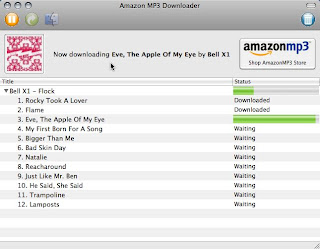


And to add insult to injury to Apple, it's smart enough to dump your new album into itunes.

Ray's new album sounds pretty good - especially for a buck less and twice the bitrate!

12/13/07

iTunes bitrates - do they matter?


I didn't used to think bitrates mattered that much for mp3s. But when Apple started offering 256k music on its store in addition to its long-running standard of 128k, it got me thinking. 


Most of my considerable music collection is encoded from CD at the 128kbps bitrate setting, and of course iTunes store downloads are 128k as well.  For kicks, I re-imported some of my all-time favorite stuff at a couple of different rates and downloaded some iTunes plus content, and compared all these new AAC mp3s with older versions. (AAC is a newer type of encoding; AAC files are still MP3s - they just use a different compression that supposedly offers better fidelity at the same bit rates and gets around other limitations of traditional audio encoding).

The result? It does make a difference, at least to me. Note I don't have the greatest physical hearing capabilities in the world (I should probably get my hearing tested at some point). However, I think I'm a bit more practiced than most at really listening critically to music. My main playback devices are an iPod hooked up to my Explorer's speakers, my computer at work through a great set of Logitech speakers, and my computer at home hooked into a decent Monsoon setup. I've got an iPod nano that I use from time to time, and often use headphones with my Macbook and desktop Macs.

Anyway, music encoded at bitrates higher than 128k - and using the AAC version instead of the straight MP3 version - definitely sounds warmer and more dynamic to me. This is subjective of course; I won't go as far as others who've subjected friends and coworkers to "blind" listening tests. But I've decided that it's worth re-encoding, and It's worth the hit I'll take in hard drive space. I can always add storage - but it's a real pain to re-rip a collection. So to those of you just getting started in the world of iTunes, do it right the first time. 

This is my general plan for re-encoding my CD collection, and dealing with new stuff:
  • 160kbs AAC - Occasional listening - a non-critical album that I might listen to once or twice a year. Can also encompass audio that's not really all that intricate and would not therefore benefit much from higher settings - an AC/DC album, for example, would be fine to these old ears at 160kbps. If it's cranked in my truck to where the speakers are distoring, the higher setting wouldn't do the higher quality track justice anyway.
  • 192kbps AAC - Regular listening -  but not quite a desert-island disc. This is a great setting and is noticeably better to my ears. It handles everything from Springsteen to Sevendust. It's my default.
  • 256k AAC - Your "can't-live-without" music. In my case, this includes pretty much all Pink Floyd, Stones, Beatles, Zeppelin, and Steely Dan albums.  Sonic treats, 'nuff said.
There are many audiophiles out there who would disagree and dig out all kinds of scientific data proving that only lossless encoding is satisfactory - but they're bigger geeks than me, and probably have nicer stereo systems and speakers. (and bigger hard drives, too - lossless audio files are huge). I'm just providing my opinion, based on my listening standards and derived from my music playing through my sound systems, so take it for what it's worth to you. But if you want to freshen up your listening experience, get out those crates of CDs and let the re-ripping begin.  And get the iTunes plus version of tracks whenever available. For now,  only the EMI catalog is sold at the higher bitrates. I've heard that Universal might be coming onboard with its catalog soon.